[ Retro Scan of the Week ] Floppy Girl Doesn’t Remember
July 14th, 2008 by Benj Edwards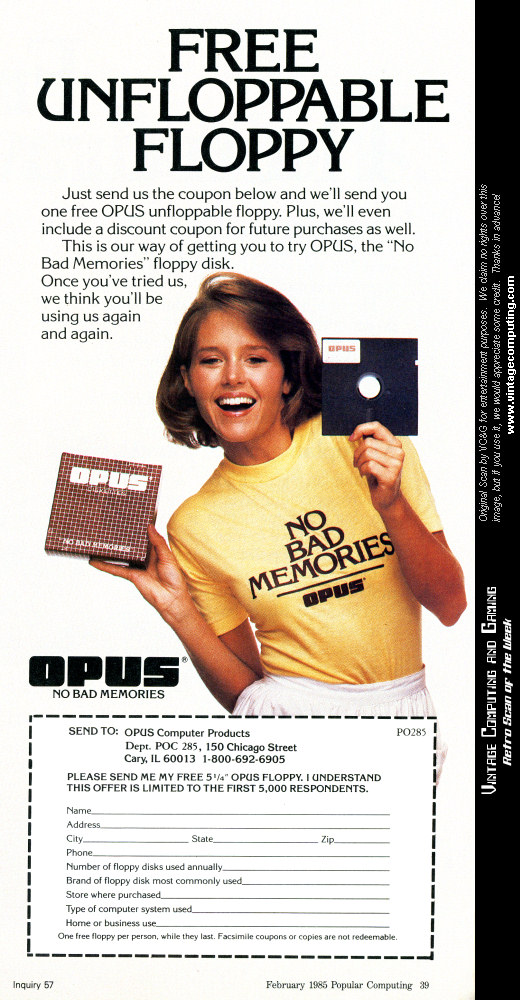 Click above for full ad.
“No Bad Memories.”
That sounds more like a slogan from a denial-centric pop psychology movement or a dystopian memory-wiping company than from a maker of computer diskettes. It would be easy to dismiss this marketing tagline as absurd, were it not for the enthusiastic bearer of the message: a buoyant, bubbly woman cheerfully peddling OPUS-brand floppy disks. Indeed, she looks like her brain was totally wiped clean by OPUS’s technical staff some time in the early 1980s — a testament that their memory technology really works.
By the way, here’s a high-resolution scan of Floppy Girl in PNG format for those of you out there who might want to turn it into a desktop background. Or print it out and impress your nerd friends with vintage floppy pin-up art.
Discussion topic of the week: Have you ever lost important computer data to a hard drive or disk failure? Share your disaster stories below.
If you use this image on your site, please support “Retro Scan of the Week” by giving us obvious credit for the original scan and entry. Thanks.




July 14th, 2008 at 1:03 pm
No bad memories, even when you touch the surface of the disk through the opening?
July 14th, 2008 at 1:34 pm
What kills me about the photo is that she’s holding it BY THE MAGNETIC MEDIA and not the protective jacket that is, what, 95% of the surface of the floppy you’re supposed to hold onto. No wonder they keep offering to send you free floppies!
July 14th, 2008 at 1:35 pm
(whoops, that’s what I get for starting a comment and finishing it an hour later)
July 14th, 2008 at 2:06 pm
10 years ago or so, I lost all the data, and it was all my fault. I wanted to add linux to the family computer, and after a lot of begging, I got the thumbs-up for it. I did everything to the letter, but I accidentally did one thing wrong: I selected the wrong partition to install it to. Needless to say, my family was livid, and I was grounded from the computer for a good period of time.
July 14th, 2008 at 2:26 pm
She’s still HAWT! Look at that BRET Girl hair,that Pam Dauber (Mork from Ork) look and feel. I’d buy the floppy!
July 14th, 2008 at 4:12 pm
It looks like there is nothing but (bad) memories left for Opus. It looks like they went out of business in 1991:
http://www.highbeam.com/doc/1G1-10730758.html
July 14th, 2008 at 8:17 pm
Looking at that ad, what was once floppy . . . is no longer floppy.
ifyougetwhatimean
July 14th, 2008 at 8:27 pm
Then I guess she should have been selling hard disks.
July 14th, 2008 at 9:36 pm
I’ve got some 5 1/4 disks with some personal data that the last time I tried to read them were severely degraded. I got off what I could (still have the originals, too), but some of it has gone to the great /dev/null in the sky. While it wasn’t anything critical, it is fond memories from a time that I consider the best time of my life. Luckily, most of it is also printed out (on 128 column green and white form feed paper).
Layne
July 15th, 2008 at 1:28 am
DE SCREEN!
DE SCREEN!
July 15th, 2008 at 10:46 am
I’ve had a couple of hard drives die on me… it’s been their motors that have gradually given out. Fortunately it happened slowly enough that I had time to copy everything off them. But it was weird how the symptoms showed themselves sometimes. One particular time I was playing some music off the hard drive and its playback actually slowed down smoothly, as though a turntable were gradually coming to a stop, then sped back up to normal speed.
July 15th, 2008 at 11:01 am
I’ve only had one memory loss issue, I hadn’t backed up in about a month or two and the drive just died. I took it to my friend who is a Linux admin and we managed to get the most important stuff off it before it finally gave up the ghost.
But man, do I wish I had those floppies. I mean, dang.
July 17th, 2008 at 1:56 am
What a coincidence! GHB lets you have no bad memories either! ^_^
July 28th, 2008 at 3:05 pm
My parents’ first computer (a 286 clone) had a somewhat-graphical menu system. My brother borrowed the 5.25 floppy to use on a friend’s computer, and then forgot about it and left it in his car. In full sunlight. For days. Of course, we only found out about this after needing to wipe and reload my parents’ PC. Enter one badly warped floppy disk that would not fit into the drive.
The story has a happy ending, though. I was able to take a blank floppy, pop the sealed edges open, remove the magnetic media, and transfer the (relatively) undamaged media from the original disk into it. It worked long enough for us to transfer the data off of it and put it in a safe location.
August 6th, 2008 at 4:18 am
I’ve had two hard drive failiures with my current computer. The first one didn’t nix any of my data. When I took the computer in for waranty repair(I’d only had it for about 3 months) the Apple certified repair shop copied the contents of my damaged drive to the new replacement hard drive. That was back in 2001…
Now, about a year or two ago I had the main boot drive…which I think was the one that they put in place of the one that failed the first time, just go completely tits up… the computer tried to access the drive and Mac OS X crashed hard. So I hit the restart button on the computer…. and found myself staring at a folder with a flashing question mark on it…. followed by it finding my OS 9 boot partition on another drive…which is when it hit me that something had just gone horribly wrong. I knew at that instant that my hard drive had just crashed.
So I tried the only thing I could think of… once OS 9 booted, I shut the comptuer down. Popped it open, and pounded my fist on the crashed drive. I turned it back on and the drive showed up on the desktop… and then dragged the bad drive’s icon over another hard drive and let it copy the whole thing under OS 9. I only lost some old iMovie stuff which would not copy.
I’m lazy… I havn’t run a back up of a hard drive since 1995… When I backed up the 350MB hard drive in my PowerMac 6100/60 to floppies.
A few years ago I found a box full of old floppies from the early to mid 1990s when I was in elementary school. I put them in one of my older Macs and was sorely dissapointed to find that over half of them had major I/O errors… Back then I used floppies as permanent(hah!) storage a lot because the 350MB hard disk in my 6100 was somewhat cramped. I lost a lot of good pirated games(nothing quite like the elementary school student piracy rings eh?) and some artwork I had done in claris works and Hypercard to that. Now, that really sucked.
February 3rd, 2011 at 11:43 pm
Wow, she’s gorgeous.
August 15th, 2011 at 12:03 am
I bought a box of Opus brand disks to make copies of software at the Orlando Faire back in the mid-80’s…
One didn’t even make it home. Several started to fail within the first month. By the end of the year, I only had a couple left – the others had already started flaking!!! I’d made backup copies and finally destroyed the last two.
Seriously crappy floppies… BONUS brand were much better!