Archive for the 'Remakes & Reproductions' Category

First Mario Adventure FAQ Posted on VC&G

Monday, February 27th, 2006

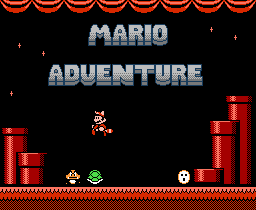
Mario AdventureYou may remember our popular feature on Mario Adventure a few weeks ago. Well, an intrepid fan named Greg Head has completed the first ever Mario Adventure FAQ and it’s now available for view on Vintage Computing and Gaming. The FAQ is mostly complete so far (except for some world walkthroughs) and Greg and I will be updating and improving it over time. You can send typo / editing / formatting errors to me, and content errors, improvements, or suggestions to Greg.

If you didn’t catch the link above, here’s where you can view the Mario Adventure FAQ.

Late Review: Hori Digital Pad for Gamecube

Tuesday, February 21st, 2006

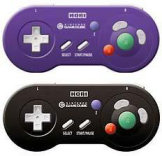
Hori Digital PadI’m a huge fan of 2D games, and the only major system that still has mostly 2D games actively developed for it is the Game Boy Advance (although that won’t be the case for much longer, as the GBA fades into its sunset years). When Nintendo announced their Game Boy Player for the Gamecube a few years ago, I was incredibly excited. Here was a chance to play completely new 2D games on a TV instead of a tiny screen — it would be like the 2nd coming of the Super Nintendo (SNES). But playing those games on the Gamecube’s very modern controller is not nearly as appealing: the analog stick is imprecise and hardly ideal for non-analog-controlled games, and the Gamecube controller’s built-in D-pad is small and placed inconveniently and uncomfortably out of the way. (Just as a note, before I go any further: it’s possible to play GBA games on the Game Boy Player using the GBA itself as a controller, connected through the GBA-GC link cable — the original model GBA feels best for this task).

Luckily, there is a nice alternative to controlling your your GBA games on the GC. Enter the Hori Digital Pad, a sleek, simplified version of the GC controller with a form-factor that obviously borrows a lot from the beloved official SNES pack-in controller. It’s about the same size and shape as a SNES pad, but the Hori Pad has raised “finger-grips” (for lack of a better term) on its bottom (toward the left and right sides of the controller) that actually make the pad more comfortable to hold for long periods of time. The most major and noticeable difference between the Hori Pad and the regular Gamecube controller is the complete and total lack of the GC’s two analog sticks. Also, the left and right shoulder buttons are not analog, but digital equivalents of the original (equivalent to pushing original GC shoulder buttons all the way down). Four of the face buttons share a nearly identical layout to the official GC controller: X, Y, B, and A. However, the Z button, normally placed on the right shoulder of the official GC controller (quite awkwardly, I might add), has been tacked on — almost as equally awkwardly — to the left of the main face button area. In the middle of the controller there are SNES-style “Start” and “Select” buttons. The “Select” button, not being present on the GC controller, is apparently mapped to the regular “Y” button (this controller mapping is default for the Game Boy Player, so it works out well).

I’m not quite sure I like the button placement on the Hori Pad. I find myself regularly wishing that its buttons were reconfigured to be equally sized, spaced, and round like on a SNES pad. The huge size difference between the B and A buttons on the pad makes for some weird playing on some games that obviously weren’t designed with this layout in mind (i.e. all GBA games). However, I understand that some people actually prefer this pad to play GC fighting games, so perhaps the similar button layout to the GC pad is less confusing. Then again, I think the weird GC button layout might be what makes fighting fans not like the GC very much in the first place. So all in all, I’d say it’s a negative feature of this pad to have duplicated the size, shape, and layout of the GC’s X, Y, B, and A buttons.

But with that out of the way, I really can’t think of anything else negative about this product. Upon holding it in your hands and actually using it, it becomes immediately obvious that this is a high-quality pad with high production values and excellent craftsmanship (as far as 3rd party controllers go, anyway). The buttons feel good to press and are responsive and accurate (it’s nice not having worn-out conductive rubber buttons for once). The shoulder buttons are a tad bit mushy, but I feel it’s not bad enough to really hold it against the product. The pad feels really good in my hands, has a sturdy construction, and its cord length is adequate (about six feet). All in all, I’d say this is a great product and I highly recommend it for anyone who spends more than a few hours playing Game Boy Advance games (or any retro games — many of which are now available in collections) on their Gamecube. The pad itself can be a little hard to obtain, as I don’t think it’s officially distributed in the US. You might have to get it through a game import place like National Console Support (Hori Digital Pad, $22 US) or Lik Sang. But for $22 (at NCS), I think it’s really worth it. Stock up now before they disappear forever and you kick yourself (I have a spare one in the wings for the future, if my first one ever wears out). And no, I’m not getting paid any money to say that. I really like the pad that much.

The Skinny: Hori Digital Pad (Gamecube)
Good Features: Accurate, responsive buttons with good tactile feel, great classic form factor, sturdy construction, nice cord length, relatively inexpensive. Great choice for playing retro games on your Gamecube.
Bad Features: Duplicates awkward face button layout of the official Gamecube controller (X,Y,A,B buttons). Shoulder buttons a tad mushy.
VC Rating:
(10 Being Best)
[ 9 out of 10 ] Shiny Marbles

EGM Advertisement:
Sell Famiclones, Go to Prison

Friday, February 17th, 2006
EGM Piracy Add

I found this interesting ad in the March 2006 issue of Electronic Gaming Monthly today. It says that as part of Yonathan Cohen’s restitution for selling “the POWER PLAYER” Famicom clone, he had to publish this advertisement warning others about “the dangers and penalties associated with violating the copyrights laws.” According to the ad, the Power Player console contains “over 40 copyrighted games belonging to Nintendo of America.” Sweet! Ahem. I mean…Let that be a lesson to ya, Yonathan, and let this be a dire warning to any other scallywag who be sellin’ the POWER PLAYERS on the open market! Heed ye not the old pirate’s warning and Nintendo will relentlessly hunt you down until all of your pathetic, filthy kind are eradicated from the face of the earth. Of course, I’m being sarcastic. But Nintendo’s not. They will kill you.

An Interview with DahrkDaiz, Creator of Mario Adventure

Monday, February 13th, 2006

Mario AdventureJust yesterday I had the opportunity to conduct an email interview DahrkDaiz, creator of the impressive hack Mario Adventure. Mario Adventure is a completely new Mario game made from modifications to the Super Mario Bros. 3 game engine for the NES. The game was the subject of a recent piece on VC&G and has proven to be quite popular now that it has been given wider attention on our site.

Vintage Computing and Gaming: Thank you for agreeing to this interview. First off, where are you from?
DahrkDaiz: Knoxville, Tennessee

VC&G: What do you do for a living?
DD: I’m currently a student at ITT-Tech and working full time at a fast food restaurant.

VC&G: Do you aspire to be a professional game designer?
DD: I hope so one day but in reality I know game design is a tough field to crack, so I’ll continue to pursue the dream in my spare time while focusing on a realistic programming career, working for businesses to make a living.

VC&G: What’s your favorite video game? Favorite Mario game?
DD: A tie between Sonic 3 & Knuckles and SMB3. [Favorite Mario Game:] SMB3, no surprise there.

VC&G: What inspired you to make Mario Adventure?
DD: The total lack of a proper Mario sequel. I was disappointed with the Mario Advance series and I saw other people’s attempt at creating a new SMB3 experience and decided to take the matter into my own hands.

VC&G: Mario Adventure has been very popular on VC&G. It been downloaded over 11,000 times from our site in the last few days. Is there anything you’d like the players of Mario Adventure to know or keep in mind while playing?
DD: This hack was made with the hardcore SMB3 player in mind. I could practically beat the original with my eyes closed and figured it was time to up the difficulty. However, I tried to include ways to pass hard obstacles easily. Use your power-ups to their fullest abilities and you should do fine getting through the game.
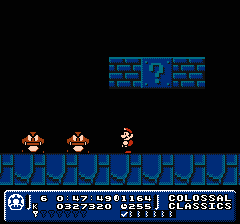
Mario AdventureVC&G: What’s your favorite new feature of Mario Adventure? Also, what’s your favorite world in the game?
DD: Definitely the key collecting idea. I always liked having to back track through levels or world to get something out of the way to continue in a game. Point A to point B grows old quickly. [Favorite World:] Colossal Classics. The giant nostalgic look just has something about it that pleases me. Though I thought I could have a slightly better job with it.

VC&G: What development tools did you use to create Mario Adventure?
DD: FCEUd (emulator with an excellent debugger), YY-Chr (graphics editing), Mario 3 Improvement (archaic SMB3 level editor), Hex Workshop (hex editor).

VC&G: How long did it take you to complete Mario Adventuree?
DD: Approximately 16 months.

VC&G: Was reverse engineering the Super Mario Bros. 3 Game engine and implementing new rules, power-ups, etc. difficult? Tell us more about how you made changes to the Super Mario Bros. 3 game itself.
DD: At first it was very difficult. I slowly began to see a certain logic used behind the game. However, when reprogramming the code, I had to find unused space in the ROM, so that was pretty much hit and miss. Admittedly I did a poor job at coding it, hence all the bugs and glitches, but I did what I could with what knowledge I knew. A lot of time stepping through code and even writing code out on paper while at work during my break was required.

VC&G: Did you do all the level design in Mario Adventure yourself?
DD: Absolutely everything was done by me in this.

VC&G: Do you think Mario Adventure would work properly if somehow put on an actual hardware cartridge and played on a real NES/Famicom? Have you ever attempted this?
DD: Unfortunately, it will not. I reprogrammed the game to take advantage of a bug most emulators have, however, I did not realize at the time that it was a bug. The hack would work on a real NES, but not properly all time. The main bug being the status bar moving up over the screen at certain times.

VC&G: Have you ever heard from Nintendo about your Mario hacking exploits?
DD: Surprisingly, no.
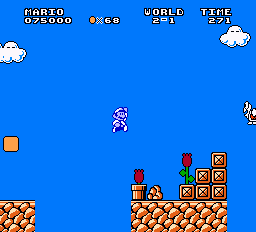
Mario SeasonsVC&G: Have you done any previous game hacking projects? If so, tell us about them.
DD: Before Mario Adventure? No, but there were a few things I did while working on Mario Adventure and afterwards. Most of it is unknown unfinished test projects. I created a cool parallax (SNES style) background scroll in Mega Man 3 for Snake Man’s stage. I hacked Castlevania 3 to start and stay as Alucard. I completely hacked Ms. Pac-Man to have 32 unique levels, a mode to play levels at random and a pellet counter. This hack is known as Pac-Man 3 and will be available on my site once it relaunches.

VC&G: What can you tell us about your next hacking project? When will it be ready?
DD: I can tell you now the next big project is another SMB3 hack. Most people may sigh at this, but I took a different approach with this hack and differs from Mario Adventure. The scale is that, if not more than Mario Adventure. It makes Luigi and Mario be separate characters with each having special powers of their own for different gameplay, including Luigi’s floaty jump and slippery control and a new item box for Mario found in Mario Adventure. Each character has their own separate 8 worlds to play through, so this is literally two hacks in one. It’s like nothing you’ve ever seen.

VC&G: Is there anything else that you’d like our readers to know?
DD: Mario Adventure is a real gem, but I’ve listened to a lot of good and bad feedback on it and this new project I’m working on addresses those issues. But I like to thank everyone who’s played this hack and given so much praise for it. It’s really inspired me to take game development as a serious career.
Mario Adventure: The Best NES Game Hack of All Time

Tuesday, February 7th, 2006

Mario AdventureIn a way, I think we all thirst for a new 2D side scrolling Mario adventure. It’s some sort of basic human need, along with eating, sleeping and reproduction. Why, just last week I was about to keel over for want of Mario when, at the last minute, I found the greatest NES game hack of all time, Mario Adventure. But this isn’t your usual game hack, mind you. You’ll find no giant buttocks glued onto Mario’s forehead, no nude Mushroom Retainers, no Super Tokin’ Brothers with Luigi replaced by a white Rastafarian with a cannabis leaf for a hat. Nope, this is a real game — a new game, crafted with care and aplomb using the Super Mario Bros. 3 game engine. Who executed this masterful feat? Look no further than intrepid homebrew coder “DahrkDaiz,” who completed the game over the course of sixteen months, sometimes coding on paper during his breaks while working at a fast food restaurant (check out our interview with Mario Adventure’s creator here). Now that’s what I call dedication. This man deserves serious recognition for the creation of this masterpiece.

[ Continue reading Mario Adventure: The Best NES Game Hack of All Time » ]

Absolutely Weird: IGN’s Generation NEX Review

Wednesday, December 21st, 2005

Generation SUXHeh. And I thought all this NEX stuff was over. It has come to my attention that IGN posted a review of the Generation NEX yesterday on their site. And what’s more, they gave it a 9.5 out of 10. Whoa. They must have been on nostalgia overdrive to hand out a score like that to a piece of absolutely mediocre hardware. Considering that the reviewer probably hadn’t played a NES game since 1992, I can almost forgive him for his enthusiasm (“WHOA!! You can still play NES games?! Dude!!”). What’s more, IGN was apparently provided a set of Messiah’s wireless controllers for free (which cost $59.99 and don’t come with the unit) and that probably significantly improved their overall impression of the NEX. They should have reviewed the wireless controllers separately. I know that whether one likes/dislikes the NEX is really a glass half-full or half-empty issue, but the NEX’s glass is definitely not full enough to warrant a 9.5. I don’t know if I should be suspicious of IGN’s review integrity, or if they just don’t know any better.
I stand firmly by my review. But of course, I also respect the opinions of others who actually like the NEX. At least most of those people have the sense to take a realistic look at it (like my buddy Jake at 8-Bit Joystick).

Update (12/23/2005): I’m not the only one who thinks IGN’s review is weird. Take a look at this thread on the AtariAge forums.

Late Review: Namco TV Games - Ms. Pac-Man Collection 5-in-1 Unit

Monday, December 12th, 2005

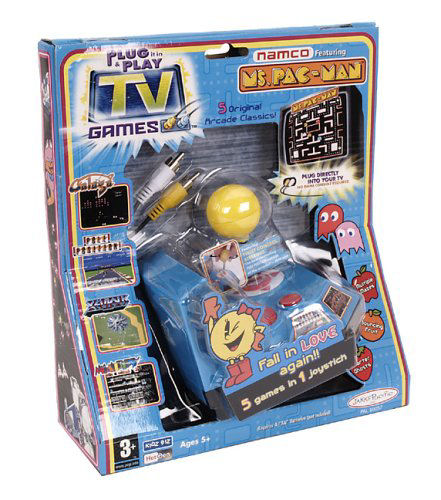
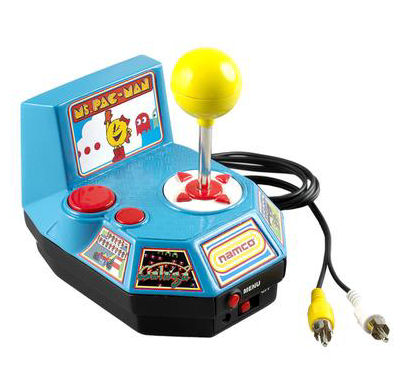
Ms. Pac-Man Collection TV GamesSo far I am an owner of four “TV Games” units. I have the venerable Atari TV Games unit that looks like a vintage Atari 2600 joystick, the highly underrated and very hackable Commodore 64 30-in-1 unit, the Namco 5-in-1 unit (with Pac-Man, Galaxian, etc), and of course, the subject of this mini-review, Jakks Pacific’s Namco TV Games - Ms. Pac-Man Collection unit. Sure, this thing has probably been reviewed to death by now, but I really wanted to share with you how cool I think this thing is. And being the picky vintage game enthusiast I am (as some might have noticed by my harsh NEX review), this is a miraculous thing.

Jakks Pacific got just about everything right with this unit. For starters, the console’s presentation is appropriate for the casual player that is likely to buy it: nostalgic and fun. The price is pretty good too. The retail price of the Ms. Pac-Man Collection is probably about $25, but I paid $15, so I am happy. But the true beauty of this puppy comes when you install four AA batteries, hook it up to the RCA phono jacks on your TV and switch it on. The built-in game selection menu is professional and nicely done. It’s easy to select from any of the five included games (Ms. Pac-Man, Pole Position, Galaga, Xevious, and Mappy Land) with the built-in joystick and buttons. The unit also has a really neat feature that is a drastic improvement from Jakks’ earlier TV games: a pause button. And not only that, but when you press the pause button (labeled “Menu”), you are given a choice to either continue the current game or return to the main menu. Very professional, and very slick. Try taking a bathroom break from a game of Galaga in the arcade and you’ll see why this is a good feature (of course, pause buttons have been standard on home consoles for years… oh well). Also, this unit has two regular play buttons instead of only one button found on earlier units, which allows for improved functionality on some games (like using it to shift gears in Pole Position). Interestingly enough, the feature of this console that I find the downright niftiest also seemed the most gimmicky to me before I tried it. I’m speaking of the “twist control” built into the joystick. That’s right: for steering in Pole Position, you twist the joystick post itself left and right as if it were a tiny steering wheel. When you release it, it springs back to a center position. I was shocked when I tried it and learned how incredibly well it actually worked. It feels smooth and responsive, and allows for really nuanced and accurate control of your car in the game. It makes the experience of playing Pole Position at home actually fun for a change. Not to be forgotten is the regular 8-way joystick, which is also very responsive — although any time you throw diagonal controls into the mix, it makes Pac-Man games a little tricky. All the controls use microswitches for a more durable, clicky, and arcade-like feel than you’d expect in a $25 novelty game toy.

Ms. Pac-Man Collection TV Games“That’s great RedWolf, I’m glad you like the buttons. But what about the games?” I’m glad you asked, Reader Steve. The collection of games in this unit is excellent, save for perhaps the inclusion of Mappy Land, which I personally could live without. Obviously Jakks Pacific and Namco wanted to milk the market for all it’s worth, separating the high-profile games into two different units (Pac-Man and Galaxian in one, Ms. Pac-Man and Galaga in another). If they replaced Mappy Land with Dig Dug, they would have made a much better collection (Xevious can stay — it adds refreshing gameplay variety, and Pac-Man and Ms. Pac Man are pretty similar anyway). The translations of the arcade games presented in this unit are near spot-on, with accurate sounds, graphics, and gameplay (as far as I can tell, anyway — I haven’t exactly lived and breathed Mappy Land like I have Super Mario Bros., for example). The unit gets a huge thumbs-up in this category — the games are extremely playable and actually fun.

By far, the biggest opportunity for improvement of the Ms. Pac-Man Collection TV Games unit is the case design. A more ergonomic controller scheme that’s more comfortable in your hands would put this unit one step closer to perfection. As it is, my hands start to get really sore after even a few minutes of gripping the bulky, sharp-angled case. But such sweet pain it is.

As a final note, it occurred to me at some point while playing Galaga that this tiny $25 console would make an excellent basis for a dedicated, home-made arcade machine. Who needs a $2000 MAME rig or a $3000 Ms. Pac Man / Galaga machine when you could hack some real arcade controls to this box, stick it in a cabinet with a 20″ TV and have a damn good recreation of the arcade for a lot less? After a little bit of poking on the net, I found that someone else had the same idea and acted on it. I might just have to do that myself some day. If I do, I’ll be sure to let VC&G readers know about it. :)

The Skinny: Namco TV Games - Ms. Pac-Man Collection (Jakks Pacific)
Good Features: Good game selection that’s fun, varied, and faithful to the arcade. Great interface. Pause feature. Microswitch controls. Twist-controller kicks ass. Easy to set up.
Bad Features: Harshly-angled, anti-ergonomic case design cramps your hands after a while. Game selection could be better, with more and/or better games included.
VC Rating:
(10 Being Best)
[ 8 out of 10 ] Extreme Super Rating Units

Lik-Sang Pulls Generation NEX from Sales Catalog

Friday, November 18th, 2005

Generation SUXChris Gregory, a VC&G reader, alerted me today that Lik-Sang, once taking pre-orders for the much-hyped Generation NEX console, has now dropped the product from its sales catalog, citing disappointment with an evaluation model they tested and also the rather negative VC&G review I posted on 11/03/2005. This move on Lik-Sang’s part really impresses me, because it shows that they care enough about their reputation to pull a product that doesn’t live up the promises of the manufacturer. Lik-Sang definitely has class. According to Chris Gregory, they have also gone above and beyond the call of duty for him in tracking down problems with hardware they sell, once even going out of their way to obtain an Australian NES to test product compatibility (incidentally, the product in question was Messiah’s wireless NES pads). Pasted below is the email that Lik Sang sent out to all the people who pre-ordered a NEX. Once again, thanks to Chris for the help.

Dear Chris Gregory,

You are receiving this e-mail because you have pre-ordered a Generation NEX.

We have taken the decision to drop this item from the Lik-Sang product catalogue, as our initial disappointment with an evaluation sample has been confirmed by the bad reviews it has received in the press. For some examples, please see the following sites:

http://www.vintagecomputing.com/index.php/archives/6
http://us.gizmodo.com/gadgets/gadgets/generation-nex-new
-old-school-suckiness-135324.php

However, if you are looking for a famiclone you may be interested in the Pocket Famicom, a portable system that comes with a TV-Out connection. You can read more about it here: http://www.lik-sang.com/info.php?category=182&
products_id=6347&

Please note that your order no. xxxxxx will be canceled and refunded within 48 hours. Please note that depending on the payment method used, the refund may take up to a couple of weeks to show up on your account.

If you prefer, you may choose to receive a refund in Store Credit on your Lik-Sang Customer Account. This is the quickest and most convenient available option, as it avoids bank and financial fees that are associated with other money transfers.

Please accept our apologies for this inconvenience.

With best regards,

Your Lik-Sang Team
———————————-
Lik-Sang.com - Alternative Gaming Community

As a side note, it’s kinda funny that the two reviews they cited were actually just one: there’s the one I posted on this blog, and then there’s a link to a news blog that quotes another news blog that quotes my review as its source. Crazy. I bet Messiah really hates my guts now. I hope they don’t hire a hit on me. Of course, they should hate their own guts for releasing such a crappy product.

No More Blinkies: Replacing the NES’s 72-Pin Cartridge Connector

Monday, November 7th, 2005

Frustrating NESIt’s an endless struggle; an epic, no-holds-barred wrestling match: Man vs. NES in a fight to the death. Or at least, in a fight to get your NES games working on that old front-loading NES. You push, it blinks. You pull, it blinks. You blow, you sneeze, you use q-tips, cleaning kits, and wow…it works? You see the title screen, but it’s still a little flaky. Things might be a little garbled, so you hit reset and it looks OK. Then an hour into playing, you accidentally tap the console and the game freezes, forcing you to start your Metroid game all over again. Blast! It’s hard to remember that your NES ever worked on the first try. There’s a fine art to actually getting a game running on an old NES. It takes a lot of patience and a certain flick of the wrist. I used to impress people at parties with my NES-charming abilities, and boy did the ladies love it.

NES 72-Pin Replacement ConnectorThe crux of this classical problem is a special connector inside the unit that wears out from repeated usage over the years. It was designed in such a way that a game cartridge can be inserted at a slight angle with little resistance, then pushed down in the spring-and-latch loading tray inside the NES, bringing the cartridge’s contacts in full contact with the connector’s pins. It’s sort of like a cartridge port version of a ZIF (zero insertion force) socket (Hmm.. Zero Insertion Force sounds like it would have been a good title for a Japanese NES game). This mechanism seems like a great idea on paper — there’s no brute-forcing the game in, and it’s easy to pull the game out of the slot when you’re done. But this delicate dance between cartridge and machine repeats it self over and over again throughout the years until the the pins in the internal connector start to lose their flexibility and springiness. And when they get slowly bent down from repeated usage, the physical contact made between the connector and the cartridge itself suffers, making it hard for the NES to read the data on the cartridge. On top of that, you have years of dust, dirt, and corrosive build-up on both the internal connector and the game itself. As a result, you get…Dum Dum Dum…The Blinkies.

Back in the day, we just threw up our hands and suffered with the problem, never really thinking there could be a solution — other than buying a later model top-loading NES (released in 1993), which eschewed the high-class ZIF mechanism for a more plebeian (and low cost) approach. And as we all now know, recent attempts at NES replacements just don’t cut it. But a few years ago, enterprising young lads on Ebay started selling replacement 72-pin connectors (the cartridge port on the NES has 72 pins) for afflicted front-loading NES systems. The concept is this: you buy a new connector, you disassemble your NES and replace the old one, and supposedly the blinkies will be gone. So about three months ago, I finally decided to buy one and try it out. Sellers want anywhere from $7 to $12 (!) a piece for these things, which is a lot of markup considering they’re probably being churned out by Chinese peasants at a cost of a cent a piece. However, they are quite unique in the world of connectors and I (in my limited experience) know of no other device that has ever used such a component. So until we find out who these sellers are smuggling these things from, the gaming public will have to put up with the high prices.

NES Apart, RF Shield RemovedI took a dive and went with a $7 connector from HitGaming.com. I bought it through Ebay, although HitGaming has its own online store too. The choice of a vendor for these things probably matters very little. I highly suspect that all of them come from the same manufacturer somewhere in the Far East. Just go for the cheapest price. HitGaming.com’s 72-pin connector arrived in a little plastic baggy with a cheaply done single-sheet print out of NES disassembly and connector installation instructions. Having disassembled a number of NESes before, I didn’t have any trouble with the installation — it’s very easy as far as console fixes go. But for those who are not experienced in taking anything apart, the operation might be a tad tricky. HitGaming.com also has extended installation instructions online with more pictures, which is definitely handy for the inexperienced. I’m not going to go into detail about the assembly and installation instructions myself, since the method to do so has been repeated many times over on the web.

I took everything apart — first the main chassis, then the RF shield, then they tray mechanism, then unplugged the old connector from the mainboard, hollowed out some incompletely drilled screw holes in the new connector, and plugged it in to the mainboard. Then I screwed only the tray mechanism back so I could test it before completely putting it back together. If I had to give one tip for the process, it would be this: there is a black plastic lip/slot on the bottom of the black spring-loaded tray that is designed to go under the front, bottom edge of the main board. Make sure you slide the tray mechanism in parallel to the mainboard and that the lip goes under the board, or else the tray will stick up too much and the spring-locking mechanism won’t work properly. After successful testing, reassemble everything else in reverse order, taking care not to mix up which screws go where.

The new 72-pin connector in my NES succeeded in eliminating the confounded blinkies. It should be heavily noted that your game cartridges need to be cleaned before inserting them into your newly refurbished NES, or else you’ll still have trouble getting them to work (and you’ll get your new connector dirty).

There was only one problem with my connector, though. The whole ingeniously-designed ZIF feature of the tray-loader was somehow negated by the new connector. It requires a strong force to push the cartridge in, and a Herculean effort to remove the cart from the system. The sheer gripping power of the new connector will surely lessen over time and use, but it’s definitely inconvenient to have to struggle to pull a game out. It’s a disappointment, but at least a cleaned cartridge works on the first try. Also, you can practically throw the NES across the room and not have the game lock up on you; the contact is that strong. Still, I wouldn’t try it on purpose (although it might happen spontaneously while trying to get past the first stage of Ghosts ‘N Goblins).

Note: Below, I am reviewing my particular connector, not the whole concept of replacing your old one.

HitGaming.com Replacement NES 72-Pin Connector
Good Features: Seemingly good quality construction, same dimensions as old connector. Eradicates the blinkies if installed correctly and used with clean carts. Installation instructions provided on paper and online.
Bad Features: Overpriced. Skimpy installation instructions. Grabs on to your carts for dear life and won’t let go. Requires disassembly and possible breakage risk in the process — not a good option for the technically unexperienced.
VC Rating:
(10 Being Best)
[ 6 out of 10 ] Shiny Marbles

Late Review: XGaming X-Arcade Dual Joystick

Saturday, November 5th, 2005

X-Arcade LogoYeah, I know, this joystick is old news. It’s probably been reviewed dozens of times. But when it first came out, I didn’t have a Vintage Computing and Gaming blog. So now I get to play catch-up and review all kinds of nifty things I’ve been buying and collecting over the years, just to add another voice to the chorus of public opinion, and to help my fellow enthusiasts, of course. And in this case, I specifically wanted to review the XGaming X-Arcade Dual joystick because I definitely think it’s worth a mention here.

X-Arcade Dual JoystickI bought my X-Arcade Dual over three years ago, and it has held up very well over the years. I originally used it with a PS/2 to USB adapter on my iMac to play arcade games in MAME. Then for a while I had a dedicated (if pathetic) MAME PC that I used the Dual with to play emulated arcade games, of course. I originally decided to get the Dual model so my buddy and I could play two-player games together (loads of fun and works great), but the extra joystick also comes in handy for games like Robotron: 2084 and Smash TV that use two joysticks in their original cabinets (one for movement and one to fire in a certain direction).

The price is a little steep (currently $129.95 for the Dual, and $99.95 for the Solo, one-player joystick), but I’d have to say that you really get what you pay for here: authentic arcade controls. This thing is made of the real stuff — industrial strength switches for the buttons and joysticks that hold up to intense pounding, while still being quick and responsive — all mounted sturdily in a heavy particle-board base that feels like it could take quite a beating itself (although not a drink spill, if it seeps through the plastic-covering’s edges). The eight standard play button positions are well thought out, allowing for the best compatibility with many different arcade games. There are also two start buttons at the top (for added authentic feel) and as a nice bonus, two buttons on either side, which work excellently as flipper buttons for a video pinball game. The overall craftsmanship and quality of the product is exemplary, and it becomes obvious once you hold the Dual in your hands that you’re dealing with a well-designed, well-manufactured product.

The X-Arcade Dual, by default, plugs into your computer through its PS/2 keyboard port, with a handy pass-through female PS/2 jack for your regular keyboard. In this way, the Dual emulates a keyboard and has incredibly large possibilities as a game controller, even for games that don’t support joysticks. You can program which buttons correspond to which keys on a keyboard using a plugged-in keyboard and a special programming button on the back. The Dual also allows you to save four different button configurations (for different games, for example), which you can toggle with a four-position switch in the back of the unit. It should also be noted that through XGaming, you can purchase various adapters that let you use the Dual (or the Solo) as a controller on traditional console game systems like the PS2 and the Xbox, although I have never tried this feature.

Overall, I’m very impressed, and yes, I recommend the X-Arcade Dual highly to anyone who is serious about playing games with MAME, or even those who just want a damn good joystick. The bottom line is this: if you want an authentic arcade quality feel to your games, look no further than the X-Arcade Dual.

And no, all my reviews won’t be this glowing. I’ll find something bad to review soon enough.

The Skinny: XGaming X-Arcade Dual Joystick
Good Features: Sturdy, arcade-authentic hardware, excellent craftsmanship and quality, great button layout, incredible compatibility options with keyboard emulation and available adapters.
Bad Features: The price is a little steep, relegating this stick to a hard-core audience. Keyboard pass-through a little awkward. Particle board body construction.
VC Rating:
(10 Being Best)
[ 9 out of 10 ] Shiny Marbles