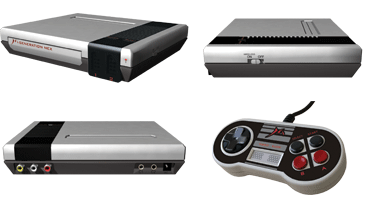
 I received my Generation NEX two days ago via FedEx, part of the first shipment of a new NES clone console from Messiah Entertainment (the self-proclaimed saviors of “gaming”). My initial impressions were good, because the packaging is pretty nice. But once you open the clear plastic box and plug it in, things get a little ugly.
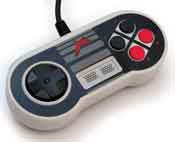
First off, the included tiny, corded controller is terrible. The buttons are laid out in a slanted pattern (which I hate.. more on that in another entry) and their feel is mushy. No, not “Excellent Official NES Controller Mushy,” but a very bad kind of mushy. And another note about the controller: look at the picture. See those two black buttons above the red ones on the right? Those are the Select and Start buttons. The two in the middle are “Slow” and “Turbo.” Also, the controller has two shoulder buttons like a SNES, except in this case they function like the regular “B” and “A” buttons. All in all, very awkward. Of course, you can plug in your original NES controller to the unit (a must), but I thought I’d mention the pack-in controller, since, after all, it is part of the package.
The sound on most of the games I’ve tried so far (SMB3, Pinball, River City Ransom, etc.) is off and not accurate (compared to being played on an original NES). The colors, too, on all games seem a little strange. Huge bummer. Also, certain games like the aforementioned River City Ransom do weird stuff when you play them, including messing up the menus, changing colors, and generally not working properly. Castlevania III doesn’t even work at all (just a blank green screen). And yes, I cleaned all my games thoroughly before trying them on the NEX. I need to test more games with this, but it feels like it would just be a waste of time. So what on earth could have led me to believe that my games would actually work on this console? Oh. Here’s an excerpt from their July 29th, 2005 Press Release:
8-bit Software Galore: Enjoy all your favorite NES and Japanese Famicom games using one console.
Also, there’s this from their Official NEX FAQ:
Q: Does it contain custom ICs, or is it based around the NOAC [NES-on-a-chip] that most “clone” consoles are based around?
A: Our IC is a custom designed IC that is built on the NES algorithm. Every attention to detail has been spent on compatibility.
Did they even test this thing? How hard could it be to make a 100% compatible NES clone in 2005? And how could they possibly say it’s truly compatible with any game? Sigh. Marketing “oversight,” I guess.
I recently have been alerted to the fact that Messiah has posted a game compatibility list on their site — conveniently long after I committed my money to the NEX (I pre-ordered in August). It makes me think Messiah themselves didn’t get their hands on the final NEX hardware until about a week before I did. If I had seen the list beforehand, I definitely wouldn’t have ordered one. Also note that a game like River City Ransom (the first game I tested with it, incidentally) shows up on their list as working (as of this writing.. they may change it once they see the criticism), but in fact if you play it, the first intro-stage has really weird colors, THEN it shows the title screen, and then you start playing. God knows how else it’s garbled up if you keep going. So I think we can tell that their game compatibility list isn’t accurate.
 The compatibility problem brings me to another issue. I suspect that the Messiah guys didn’t do the hardware development on this machine. I think they probably repackaged the latest Asian gray-market Famicom clone, perhaps adding the built-in wireless controller functionality themselves in the process (supposedly its best selling point, although I have not tested it). If anyone can find some hardware design credits on their site (There are none in the system manual, only to the “President” and some marketing guys), let us all know. This whole thing stinks like fish. And speaking of the President, here’s an inspiring word from the man himself, direct from their May 23rd, 2005 press release:
Brad Strahle, Messiah’s President, considers the Generation NEX to be one of the most important retro products available. “With the release of Generation NEX, we want the core gamer to know that we have not forgotten our roots. Classic gaming is where it all began and with Generation NEX the classics will live on.†Strahle continued, “All gamers will love playing their favorite retro games on the Generation NEX and enjoy them with a new passion.â€
Safely considering myself to fall under the banner of “all gamers,” as mentioned by Mr. Strahle in the release, I am sorry to say that I don’t love playing my favorite “retro” games on the Generation NEX. The only new passion it has inspired in me is a distrust and dislike of a company known as Messiah Entertainment. I highly recommend staying far away from this me-too capitalize-on-retro-craze rip-off. It has game compatibility akin to, or even worse than, a $10 Chinese Famicom clone. For $60 you could probably get an original NES with a new 72-pin connector in it, some real NES controllers, and ten or more decent games. Avoid the NEX and get the real thing (Ebay is calling). With all its problems, it would have more appropriately been named the Generation SUX. Yeah, I know; that’s hitting below the belt. But I never promised a civil review.
By the way, if anyone is lured by the pseudo-stereo capability of this thing, don’t be impressed. Just use an RCA 1 Male to Two Female Y-cable on a normal NES. It splits the mono signal into two channels so you can easily plug it into both your left and right audio input on your TV or receiver.
With this thing being such a bust, check out my article on replacing the 72-pin cartridge connector on your NES and eliminating the blinkies.
Review Update (11/10/2005): A few people have told me that I didn’t mention that the NEX plays original Famicom carts as well as regular NES games (through a slot on the top of the unit), and that this is a strong feature of the unit. My review was originally targeted at people who were already familiar with the system’s features, hence the oversight. But it is worth mentioning, and it does play them — I tried the only two Famicom games I have (Robocop 2 and Zippy Race) the first day I got it, and they worked, although Robocop 2‘s music seemed a little messed up. The Famicom cartridge slot is a nice extra, but I reviewed this system from the standpoint of a complete NES replacement system, as it is primarily marketed. Unfortunately, the NEX fails miserably at this task. I suspect that the attractiveness of the NEX for most people (the general gaming public) would be as a replacement for an old, unreliable front-loading NES, for which they might actually have games. It’s highly likely that only the most dedicated of NES fans have Famicom carts they want to play. But if Famicom compatibility is your thing, go for it. Nobody’s stopping you but your own wallet.
Second Update (11/14/2005): If anyone wants to know more about Famicom to NES converters inside copies of Gyromite, check out my new article on it here.
Third Update (12/21/2005): What’s up with IGN’s weird Generation NEX review? I don’t know. My comments about it are here.
| The Skinny: Generation NEX |
| Good Features: |
Die-cut manual that looks like a NES cartridge in a case. Nice industrial design on the console’s exterior (Probably the two things actually designed by Messiah employees). Doesn’t explode when you turn it on. |
| Bad Features: |
Pathetic game compatibility. Glitchy sound. Dumb pack-in controller design with superfluous buttons and odd button placement. |
VC Rating:
(10 Being Best) |
[ 4 out of 10 ] Shiny Marbles |
 Chris Gregory, a VC&G reader, alerted me today that Lik-Sang, once taking pre-orders for the much-hyped Generation NEX console, has now dropped the product from its sales catalog, citing disappointment with an evaluation model they tested and also the rather negative VC&G review I posted on 11/03/2005. This move on Lik-Sang’s part really impresses me, because it shows that they care enough about their reputation to pull a product that doesn’t live up the promises of the manufacturer. Lik-Sang definitely has class. According to Chris Gregory, they have also gone above and beyond the call of duty for him in tracking down problems with hardware they sell, once even going out of their way to obtain an Australian NES to test product compatibility (incidentally, the product in question was Messiah’s wireless NES pads). Pasted below is the email that Lik Sang sent out to all the people who pre-ordered a NEX. Once again, thanks to Chris for the help.
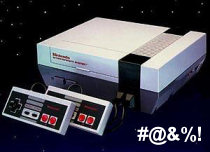 It’s an endless struggle; an epic, no-holds-barred wrestling match: Man vs. NES in a fight to the death. Or at least, in a fight to get your NES games working on that old front-loading NES. You push, it blinks. You pull, it blinks. You blow, you sneeze, you use q-tips, cleaning kits, and wow…it works? You see the title screen, but it’s still a little flaky. Things might be a little garbled, so you hit reset and it looks OK. Then an hour into playing, you accidentally tap the console and the game freezes, forcing you to start your Metroid game all over again. Blast! It’s hard to remember that your NES ever worked on the first try. There’s a fine art to actually getting a game running on an old NES. It takes a lot of patience and a certain flick of the wrist. I used to impress people at parties with my NES-charming abilities, and boy did the ladies love it.
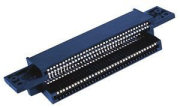 The crux of this classical problem is a special connector inside the unit that wears out from repeated usage over the years. It was designed in such a way that a game cartridge can be inserted at a slight angle with little resistance, then pushed down in the spring-and-latch loading tray inside the NES, bringing the cartridge’s contacts in full contact with the connector’s pins. It’s sort of like a cartridge port version of a
 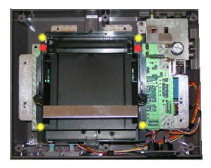 I took a dive and went with a
  Yeah, I know, this joystick is old news. It’s probably been reviewed dozens of times. But when it first came out, I didn’t have a Vintage Computing and Gaming blog. So now I get to play catch-up and review all kinds of nifty things I’ve been buying and collecting over the years, just to add another voice to the chorus of public opinion, and to help my fellow enthusiasts, of course. And in this case, I specifically wanted to review the
 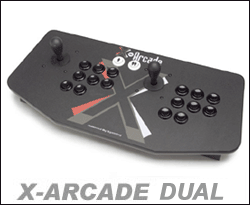 I bought my X-Arcade Dual over three years ago, and it has held up very well over the years. I originally used it with a PS/2 to USB adapter on my iMac to play arcade games in MAME. Then for a while I had a dedicated (if pathetic) MAME PC that I used the Dual with to play emulated arcade games, of course. I originally decided to get the Dual model so my buddy and I could play two-player games together (loads of fun and works great), but the extra joystick also comes in handy for games like Robotron: 2084 and Smash TV that use two joysticks in their original cabinets (one for movement and one to fire in a certain direction).
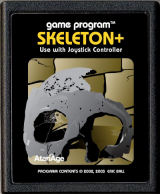 First of all, the store’s design and functionality is excellent. It is organized in a relatively easy to understand and navigate manner. If I ever ran an online store, I’d probably shamelessly pattern it after AtariAge’s store/shopping cart software (whether custom or a modified package, it’s still good). AtariAge’s checkout process integrates seamlessly into the PayPal system and payment via credit card is easy and fast (AtariAge also accepts check/money order payment, but I haven’t tried that). Their shipping options (typically USPS First Class and USPS Priority Mail) are realistic and actual-cost — no shady handling fees padded onto the total. After waiting a week or maybe less, depending on which shipping method selected, your package arrives. I personally was very happy with the speed at which the products got here, and the professionalism with which they were packed (the padding seemed adequate for the items inside), complete with a packing slip / receipt inside the box. The items that I ordered were exactly as described, obviously handled with care and in excellent condition.
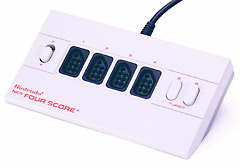 Over the past 6 years I have been looking for an easy way to interface my original NES pad with my PC so I could play NES games on an emulator with an authentic feel. There was only one realistic option I knew of: a parallel port interface hack that had spread around the Net over the years, but I never quite got around to doing it. Then, early this year I stumbled across