Welcome to the Family, Whiz-Kid
March 20th, 2008 by Benj Edwards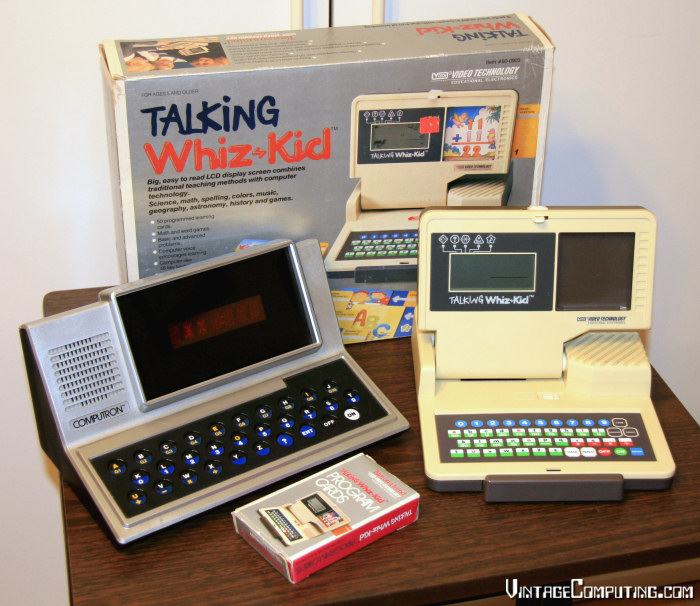
Yesterday afternoon, I made a trip to some local thrift stores that I hadn’t visited in eight years. I left with a 24-game N64 cartridge drawer, some books, an unopened copy of Bill Gates’ The Road Ahead on audio cassette, some neat board games, and the two devices you see above. It’s more junk, but it’s good junk.
The VTech Talking Whiz-Kid (1987, right) came with the box, manual, and cards. This educational toy reads paper “program cards” as you insert them into an optical reader slot. The cards don’t contain any software, but instead bear a simple bar code that tells the Whiz-Kid which built-in program to start. Highlights include Hangman, word scramble, and an extremely limited calculator.
I remember seeing the VTL Computron (1980, left) in J.C. Penney catalogs as a kid. It works too, although it’s missing the battery door. The LED-based Computron plays matching games based on which letter you select. Most of the games obviously went along with a printed guidebook that I don’t have.
Neither device does BASIC like the VTech Pre-Computer 1000, but they’re both highly collectible microprocessor-powered toys. Total cost for both? $10 (US).
Anybody else have one of these? Feel free to share your memories with us.



March 24th, 2008 at 12:58 pm
I played with a talking Computron years and years ago that was just too cool. Our interest ran out long before the keyboad cracked.
March 25th, 2008 at 12:20 am
Oh wow, I had a talking whiz-kid when I was little; I’ve been looking for one for a while now, but couldn’t remember what it was called.
Unfortunately, disorganized little 8 year old that I was, I lost a lot of the cards. However, I remember you could play simple music with it.
thanks for jogging my memory!
April 3rd, 2008 at 10:56 am
I too visited a local thrift shop and picked up the talking whiz kid knowledge ball 1997 and the language laptop 2001 niether came with the manuals. Do you know of anyone who has the manuals for either models and can email them to me?
My kids 3 and 5 love them but are limited ,especially due to my lack of electronic knowledge.
Thanks
April 17th, 2008 at 9:26 pm
Hey…I was trying to find information on my whiz kid any idea if they are collectors items? I just found my Whiz-kid in working condition in the garage 984 version, looks like an old mac. It’s Super awesome. Like i said, working, it has the Series A basic cards that probably came with it. Any idea where i could pick up the memory card or more advanced cards?
Whiz-kid from vtech seems to be producing crappy looking ones that don’t take the same cards. Which upsets me. Any ideas would help.
August 21st, 2008 at 7:17 pm
I just dug out my old computron figuring it might entertain my 18 month old long enough for me to use the real laptop! However, for the life of me, i cannot figure out how G4 and G5 work. I’m thinking it might have something to do with having the manual?
August 26th, 2008 at 11:03 pm
wow thats an odd looking Computron. i have the later one that was more boxy.
heres a picture of one if youre interested:
http://farm4.static.flickr.com/3275/2546792037_bce3195da8.jpg?v=0
although mine doesnt have those swicthes sticking out of the top
September 3rd, 2008 at 6:37 pm
I also found one of the whiz kids at a thrift store but with no cards/cartridges. How many came with yours and do you know whether anyone has any and willing to sell them?
October 15th, 2008 at 11:09 am
I also am having a hard time figuring out what some of the games are. The Computron belonged to my husband when he was a kid. We know have three of our own and I though it might be useful to keep them occupied and help them learn. Problem is I can’t figure out how to play a few of the games. Anyone know where you could find the mannual that it came with? I think the kids would love it…
November 1st, 2008 at 10:12 am
Hi
I’m 12-years old and autistic and I really want the paper cards for the Whiz Kid. Can anyone help me with some resources to find them?
Thank you!
Jacob
February 25th, 2009 at 6:39 pm
I have a 1984 Whiz-Kid that was mine as a child–before they were talking! I still have the box & most of the “Basic” card set as well, but the manual has gone missing (think it’s hidden in the closet, safe from my kids). For those looking for the paper cards for the Whiz-Kid…you don’t need them to make the unit work…the “Basic” card set is stored in the memory of the unit (to use additional card sets, you need a cartridge to over-ride the built-in program) and each game can be accessed by entering a code (handy, in case the bar code on a card is unscannable). If I’m ever able to find the missing manual, I will post instructions on how to access the built-in games 🙂
June 1st, 2009 at 10:35 pm
Yes, but what ARE the codes? I have the Talking Whiz Kid that my quadruplet sons used about 24 years ago. I’d just love to find out what the codes are. We’ve lost the cards and don’t have the codes stored anywhere. Ideas?
June 27th, 2009 at 3:54 pm
Came home and saw my mom (Janna Wagner from the above comment) trying to figure it out. So I tried a few key combinations, and found the correct method to get some programs to load:
1) Press “On”
2) Press “Code” (since we don’t have any cards to insert anymore, this worked)
3) Press any number from 1 to… I don’t know, I got up to 29, and then press “Enter”!!! You will be asked the programs questions now. My parents were trying 3 digit numbers like 333… well, when these things were created there was no way they had enough memory for that many programs, so you start from the #1 and programs go up incrementally.
Some require an accompanying multiple choice answer list apparently, because some just said “what is ‘b’?” So we just tried the programs with math questions.
Does this help any people other than my mom?
July 2nd, 2009 at 4:35 pm
OK, I found the missing manual! And as promised, here are the instructions on how to use the Whiz Kid without the paper cards.
Quoting from the book:
“What to do if a card is lost or destroyed
The Whiz-Kid keeps a memory of all the questions and answers to every picture card. All cards are listed by number and title in the back o this manual. Be sure the dashed —— are displayed on the screen, then press the “code” key and the corresponding code for the lost card. The missing questions will appear on the screen and you’ll be able to answer them as before.”
OK, me back again…some of the questions refer to pictures on the cards. I will provide here a list of the card title and the code to access it, but please keep in mind two things:
1.) This manual is (c) 1984. If you have a newer Whiz-Kid with lost cards, the codes (or “games”) might be different.
2.) Some of the “games” aren’t playable without the card, because you can’t see the picture (and the answers are multiple-choice (a,b,c,d or 1,2,3,4 style) and listed on the picture). If you’re real clever, you’ll notice that some of these codes are the same for different “games”. That’s because the answers to the questions (at least so far as a,b,c,d or 1,2,3,4) are the same even though the pictures on the cards are different. That’s probably how they were able to offer so many “different” games on the limited amount of memory 😉
Quoting from the manual again:
“All the cards and what they do
No./Title/Code
1/Memory Tune/ai
2/Scrambled Words-Feelings/NO CODE GIVEN
3/Shaping Up/ba
4/More Shapes/bb
5/Favorite Colors/cb
6/More Favorite Colors/bb
7/Pick a Color/cc
8/Tall/Short and Match Colors/cd
9/Camparison-Weak/Strong/ce
10/Comparision-Fat/Thin/cf
11/Scrambled Words-Detective/cg
12/Scrambled Words-Animals/ch
13/Tangled Lines/bb
14/Addition/aa
15/Subtraction/ab
16/Multiplication/ac
17/Division/ad
18/Math Quiz/ae
19/Operations/af
20/What?/ah
21/Counting/bd
22/Scrambled Words-Mixed-up Seasons/ci
23/Multiplication/ag
24/Jobs/cj
25/Match the Shapes/ba
26/Growing Up/bc
27/Going Together/bb
28/Before & After/bb
29/What Do they Do?/ba
30/Where To Wear?/ck
31/Food For Animals/cl
32/More Food For Animals/cm
33/More Food For Animals/bc
34/Foot Prints/cn
35/What’s What?/co
36/Weather/da
37/Funny Face/db
38/Body Shop/dc
39/The Beach/dd
40/Farm Animals/de
41/Classroom/df
42/Bedroom/dg
43/Kitchen/dh
44/Playroom/di
45/Meadow/dj
46/Family/dk
47/Toys/dl
48/Travel/dm
49/Restaurant/dn
50/Camping Out/do
July 3rd, 2009 at 4:33 pm
This is the list for A pack of cards that we have:
1 Basic addition
2 Advanced addition
3 Basic subtraction
4 Missing (probably advanced subtraction)
5 Basic multiplication
6 Advanced multiplication
7 Basic division
8 Advanced division
9 Math quiz 1
10 Math quiz 2
11 2 player math: one person makes up a math problem in addition, subtraction, multiplication or division and enters it in the machine. The second person answers the problem.
12 Operation 1: Do you know the operation sign for each math problem? Enter the correct operation sign for the displayed math problem.
13 Operation 2
14 Calculator: Make up a problem in additon, subtraction, multiplication or division using up to 3 digits per number. Press the enter key and the machine will give the answer up to a 4 digit number.
15 My head: need the card for the picture of a face
16 Zoo: need the card
17 Fruit: need the card
18 Home appliances: need the card
19 Furniture: need the card
20 Tools: need the card
21 Toys: need the card
22 Bad weather: need the card
23 Clothes: need the card
24 Stationery: need the card
25 My body: need the card
26 What things do: need the card
27 Relation: need the card
28 World Map: need the card
29 World structures: need the card
30 Flags: need the card
31 Jobs: need the card
32 What are they doing: need the card
33 Colors: need the card
34 Planets: need the card
35 Musical instruments: need the card
36 Spelling: Listen to the word then type in the letters
37 Learn & spell: The machine shows a word, spells it, and pronounces it for you. You must then spell that word again correctly.
38 Say it: The machine will display words and say them once. Repeat the words that you hear.
39 Complete the word: The machine displays a word with a letter missing. Enter the letter which correctly spells the word.
40 Begins with: The machine shows words with the first letter missing. Enter the letter that correctly begins the word.
41 Hangman: The machine shows a number of blanks equal to the number of letters in the mystery word. Enter each letter of the word and the machine will put it in its correct position. You have 8 chances to discover the word.
42 Missing (I think this is the 1 player scramble. My kids wore the card out))
43 2 player hangman: One player enters a word (up to 8 letters long) into the machine. The second player must guess that word, letter by letter.
44 2 player scramble: One player enters a correct word (up to 8 letters long) into the machine that will be scrambled. The second player must unscramble that word by rearranging the letters.
45 Memory tune: Find the musical notes on the keyboard. Press the notes you want to make up your own tune. The machine holds up to 32 notes in 3 octaves. After you have entered your notes, press the enter key to hear your composition.
46 ABC song: Find the notes on the keyboard. The machine will play a song for you. Then you follow the notes on the card to learn the song. Enter the right note by pressing that key on the keyboard. Keep going until you have played the entire tune.
47 Jingle bells: same directions as 46
48 London bridge: same directions as 46
49 Happy birthday: same directions as 46
50 Follow me: The machine will make random notes and ask you to repeat those notes in the same order. A total of 16 notes can be used.
Hope this helps.
July 3rd, 2009 at 5:28 pm
This is for the C cartridge Vocabulary Builder 2:
1 Spelling: The machine will ask you to spell words at random. Listen carefully, then type in your word.
2 Learn & spell: The machine shows a word, spells it, and pronounces it for you. You must then spell that word again correctly.
3 Say it: The machine will display words and say them once. Repeat the words that you hear.
4 Complete the word: The machine displays a word with a letter missing. Enter the letter which correctly spells the word.
5 Begins with: The machine shows words with the first letter missing. Enter the letter that correctly begins the word.
6 Hangman: The machine shows a number of blanks equal to the letters in the mystery word. Enter each letter of the word and the machine will put it in its correct position. You have 8 chances to discover the word.
7 Scramble: The machine displays a word whose letters are mixed up. Rearrange the letters so that it spells the word correctly.
8 Astronaut: need the card
9 Rocket’s structure: need the card
10 Control room: need the card
11 Solar system: need the card
12 Space Traveling: need the card
13 Space vehicle: need the card
14 Route of Voyager 2: need the card
15 Lunar-Roving car: need the card
16 Galaxy puzzle: need the card
17 Space quiz: need the card
18 What is it? need the card
19 Rocket: need the card
20 Squiggly: need the card
21 Radio control sustem: need the card
22 Astrometry: The machine shows a letter for each asterisk. Enter the number from the list on the right that identifies it. Since I love astronomy, I am including the list: 1. Pegasus, Flying Horse, 2. Cygnus, Swan, 3. Ursa Major, Great Bear, 4. Leo, Lion, 5 Gemini, Twins, 6. Cetus, Sea Monster, 7. Crux, Southern Cross, 8. Sagittarius, Archer
23 Future City: need the card
24 Formation: The machine shows a letter for each object. Enter the number from the list on the right that can rebuild the object.
25 Computer graphics:need the card
July 13th, 2009 at 3:16 pm
i have the vtech talking whizkid its pretty fun, its used to be my cousins
August 20th, 2009 at 7:42 pm
http://www.vtechkids.com/_f/_pw/_manual/TalkingWhizKid.pdf
April 28th, 2010 at 11:22 am
I remember ‘Follow Me’. Best game ever. Unfortunately my Whiz Kid was passed on to a younger cousin and I haven’t seen it since.
November 20th, 2010 at 11:12 pm
Looking for the talking Whiz kid cards! Anyone have ideas?
March 4th, 2011 at 10:00 am
Hi, i’m from south america, Chile and a did learn english with this very device, it was so helpful. But i lost all the cards, do you guys think you could scan, at least those cards that need the picture to be played. For instance a scan from cards A15 to A35. I think it’s not such a big effort considering you could put 4 or 5 cards into one scan, and if you do so, i could cut them and then upload them somewhere so our children can play with it as we did too.
thank you all very much
my email in case you feel like the idea is diego.lazo.opazo@gmail.com
bless
November 30th, 2011 at 6:37 pm
i have a 1984 Vtech Whiz-Kid in the box still looks brand new with all the started cards. My wife found it in a box of stuff from when she was a kid.
December 7th, 2011 at 11:56 pm
Chad, Please contact me if interested in selling it!! nlepori@hotmail.com
November 19th, 2012 at 5:08 pm
Does anyone know where to find a file or something of the 1980 Computron? I got one yesterday, and I can’t figure out most of the stuff with it, I believe it requires a manual. Please comment with any info possible, thanks!
October 14th, 2016 at 11:47 am
I have a mint working whiz kid with the basic cards and manual. email me with offers davesno1@start.ca