Shortcut to Booting MS-DOS on the Compaq IA-1
Tuesday, January 10th, 2006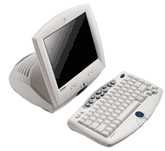 Ah…more on my continuing adventures with the not-so-vintage, but very much obsolete Compaq IA-1. I got Midori Linux running long ago, but I’ve since longed to turn this thing into an MS-DOS machine, maybe to play some old shareware games with. The hardest part of booting MS-DOS on the Compaq IA-1 is making a bootable partition on a compact flash card. The IA-1 treats its compact flash slot it has like a regular ole IDE hard drive connection, as compact flash cards have a native mode that emulates IDE hard drive behavior (and therefore, the compact flash, when in use, is not hot-swappable). The problem arises when you try to format a compact flash card using a common USB compact flash adapter: Windows treats the card as a removable drive, and thus, no low-level formatting options (like making it bootable with system files on it) are available.
Luckily, with a tip from the I-Appliance BBS (an incredible resource, by the way), I found a freely-distributable program from HP that they made to format their Disk-On-Key USB JumpDrives (or whatever they call them newfangled things these days) to make them bootable. And guess what– it seems to work with all removable drives! It’s an incredibly nifty little program; there’s even a DOS version. So how do you get it? Relax, I’ve done all the work for you (impatient people who don’t actually read what I write will no doubt be struggling to find the link — buried in the text!). Here, in this file, is a perfect little Compaq IA-1 MS-DOS kit. Included in the zip file is the aforementioned program installer (for Windows, also includes DOS version), and a directory containing a modified version of MS-DOS that came with Windows 98 (some wise-guy Windows-hata changed all the files to say “MS-DOS 7.10” instead of “Windows 98” when you boot, etc., but it works great). All you have to do is install the program, set up your compact flash adapter, insert a card, run the HP program, and format it to include system files. When it asks which files to include, simply point it to the “MS-DOS 7” directory that is included in the ZIP. There you go.
After that, you’re on your own. I’ve played a few games of Scorched Earth and ZZT on it so far, but it’s a tad bit lacking without any sort of PC speaker sounds. Also, I have absolutely no DOS drivers for any of the IA-1’s built-in hardware, so unless you find them or write your own, you’re stuck to only the most rudimentary of programs. But still, MS-DOS on the IA-1 is a wonderful starting point to bigger and better things. Windows 98 on a microdrive anyone?
Another IA-1 update: I bought a used NetGear MA111 wireless 802.11b wireless network adapter because its chipset is supposedly supported by the drivers built-into the Midori Linux distro I’m using. So far, no luck getting it working, but I haven’t tried everything yet. I’ll mess with it some more later.
Also, here’s a cool PC World article on why Internet Appliances never took off. Tomorrow’s computer collectibles…today! Get ’em before they hit the dump.


 Computer hard disks weren’t always as reliable as they are now. From 1992 up until about five years ago, it seemed that I had a drive crash on me at least once every two years (Hmm.. they ceased right about the time I stopped buying OEM Western Digital drives from a questionable source). A total drive meltdown was always a terrible event, but it was still no where near as catastrophic as it would be now. You see, back then, the data on my computer was usually just stuff I had downloaded from BBSes or the Internet, maybe some text and Word files, and a few games. But these days, people keep their entire lives on their computers, including home movies, digital family snapshots, personal correspondence (in the form of emails), and gigantic music collections. Not to mention that more original creative work than ever is being done on computers these days — musicians record directly to them, photographers process their pictures on them, illustrators draw and paint with them, and writers write with them. This creative data is unique and irreplaceable — you can’t just download it again if you lose it, making a data backup plan absolutely essential for the modern computer user. Of course, I’m sure most people don’t back up their stuff, and computer users everywhere lose valuable data on a daily basis. Considering the importance of the personal data on PCs these days, I find it absurd that computer manufacturers don’t include some sort of redundant disk protection by default in every PC sold (or at least the build-to-order option). As RAID controllers get more economical thanks to the widespread adoption of the Serial ATA standard, such a scenario will become more realistic. I’m going to go out on a limb and predict that in five years, redundant data protection of some kind will be a standard feature on all consumer PCs. From now on (starting with my last two computers), I’ll never build another computer again without at least RAID level 1 (data mirroring) protection. I also do daily backups to an external hard drive on my three main computers for an extra level of safety.
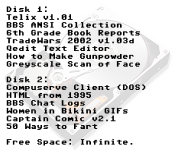 But my backup regimen isn’t really what I want to talk about today. No, it was my complete lack of one that we’ll focus on for the moment. Back when I lost my hard drives, I usually lost most or all the files on them as well. This functioned as sort of a “natural reset” (a
  Ah…the trusty Goodwill store. Once the last bastion for countless old computers thrown out by a thankless middle-class America that had grown tired of them, it’s now merely a graveyard for broken VCRs and 1970s-era crockpots (you can always find at least one crockpot at any Goodwill store). So what happened? Around 2001, if I recall correctly, GCF was choking at the gills with hordes of truly worthless PC-clones that no one ever bought. They kept pouring in, non-stop, stacking up at the back of every store. The only thing
 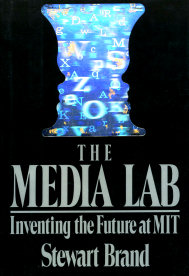 Paperback books cost fifty cents a piece; hard cover books, one dollar. That’s where I found the first edition of “The Media Lab” by Steward Brand (1987), hardcover and in great condition. This is a really cool find — an excellent addition to my computer history library — at a great price. It’s fun to see what was considered futuristic even as recently as 1987. The book has a great picture section in the middle (Grog no like words, Grog like piktures!), which, since I haven’t actually read the book yet, will have to suffice for a source of a description of the book. There are examples of early computer illustration software, rudimentary 3D computer graphics, anti-aliasing for digital text, force-feedback joysticks, holograms, AI, and something called NewsPeek, which was an idea for an electronic newspaper with eerie echos of the World Wide Web before such a thing existed. If it deals with computers and media, the MIT lab did it all first. And, if I may add personally, they also repeatedly failed to capitalize on their discoveries first, a ridiculous flaw of many a government and corporate think-tank and R&D division over the years (Xerox PARC comes to mind). “But RedWolf,” you say, “That’s not the purpose of a research institution!” I don’t care. Many incredible inventions are made at university labs, but it always takes a maverick separatist entrepreneur to break off from the organization and bring the benefits of those inventions to the masses. Otherwise, great ideas would stagnate there forever, and die on the vine where they were grown. Until new technologies are actively pushed and available in the marketplace, they’re just academic play-toys that don’t help anybody, hoarded by elitist engineers. So am I criticizing academic and big organization research? Hell yes. But hey, that opens up another can of worms, and I think it’s time to eat lunch.