SomethingAwesome: RetroZone’s FourScore USB Interface
November 3rd, 2005 by Benj Edwards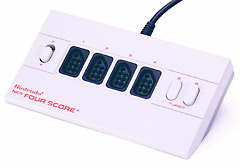 Over the past 6 years I have been looking for an easy way to interface my original NES pad with my PC so I could play NES games on an emulator with an authentic feel. There was only one realistic option I knew of: a parallel port interface hack that had spread around the Net over the years, but I never quite got around to doing it. Then, early this year I stumbled across RetroZone’s site. There I found an array of different vintage controllers available for sale with USB (!) interfaces. Now we’re talking! USB is the way of the present and the future — I don’t want to be saddled with having to hook up parallel port stuff to my circa 2010 PC (which almost definitely will not have a parallel port). All of RetroZone’s USB controllers apparently use a specially programmed microcontroller to convert the original pad’s signals into a USB signal that a PC can understand. After browsing the options (a converted NES controller for $26 and a $17 do-it-yourself kit among them), I settled on the FourScore USB model, which seemed like a great deal to me at $60. Sure, I’ve seen some people balk at these prices, but I think they’re really cheap for saving me the labor and sheer mental strain of devising and doing such a mod by myself. With the FourScore one, you can use up to four NES controllers on one USB port. And even better, you can use any NES controller you want — you don’t have to be stuck with a converted one that might have bad conductive rubber pads in it. So I ordered it via PayPal, and a week or so later, it arrived.
The arrival of this product was one of the most exciting things that happened in a long time, having recently acquired, through BitTorrent, an archive of all known 10K+ NES and Famicom ROM files (the legality and morality of doing such will probably be debated in a future entry). I opened up the box and plugged it in. The FourScore was in pristine condition (no surprise, since I have about five unopened FourScores in boxes that I bought for $5 a piece in 1995), with a mint-condition USB cable. The craftsmanship was flawless, with the USB cable coming out of the FourScore as if it were meant to be there, complete with molded USB connector and all. I plugged it in and Windows 2000 instantly recognized it. I plugged in a NES pad into port one of the FourScore and Windows 2000 also instantly recognized it as a joystick (which is great, because it means you can use it with anything that supports Windows joysticks). I fired up FCE Ultra, my emulator of choice and configured the pad. In no time, I was playing Super Mario Bros. full-screen on my PC just as if it were a real NES. The pad had incredible response time — no noticeable delay — and flawless performance. Since then I have played a hundred games with the pad and adapter with no problems. I’ve also plugged in a 2nd pad into port two of the FourScore and played some Bubble Bobble with a friend, without a hitch. I’m sure it would work with four pads if I tried it, but I haven’t gotten around to it yet.
All in all, I am extremely impressed with this product and recommend it highly to anyone who plays emulated NES games on their PC. There’s nothing quite like playing a NES game with the original controller — it will never feel authentic otherwise. RetroZone is the real deal, doing their service for the love of the game. My next project will be making a dedicated NES emulator machine to hook up to my TV for the complete experience, which I will detail in a future entry. 🙂
| The Skinny: RetroZone’s FourScore NES USB Interface | |
| Good Features: | Everything. Flawless craftsmanship of the highest quality. Works exactly as promised. Convenience and ease of use is incredible. Fast response times, easy setup, reasonable price. |
| Bad Features: | Honestly. I tried, and I can’t think of one thing. |
| VC Rating: (10 Being Best) |
[ 10 out of 10 ] Shiny Marbles |
 Last week I ordered two new
 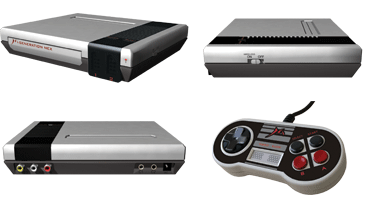 I received my
 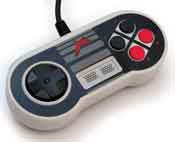 The compatibility problem brings me to another issue. I suspect that the Messiah guys didn’t do the hardware development on this machine. I think they probably repackaged the latest Asian gray-market Famicom clone, perhaps adding the built-in wireless controller functionality themselves in the process (supposedly its best selling point, although I have not tested it). If anyone can find some hardware design credits on their site (There are none in the system manual, only to the “President” and some marketing guys), let us all know. This whole thing stinks like fish. And speaking of the President, here’s an inspiring word from the man himself, direct from their May 23rd, 2005 press release:
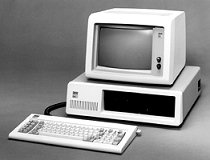 I’m convinced that computers make the worst monetary investment of a physical item in history, continually going obsolete and losing 95% of their value in just a few years. As a result, I’ve spent most of my money on things that are now near-worthless. This sort of situation is probably unique in the history of mankind if you think about it. If I want some quick cash, I can’t just sell my computer that I paid $2000 for a year ago to get $2000, or even $1000. Not only since it’s used, but since it’s yesterday’s news that it is now worth bupkis. Contrast this to buying a used car for $2000. Take good care of it, and it’s probably still worth about $2000. Or real estate, which only seems to rise in value over time (unless the neighborhood goes to hell). Or, heck — even a table. You can buy one for $20 at a yard sale. It works. You use it. You can sell it for $20 if it still does its function. Nobody has come out with a “Super Table 2000” that has completely obsoleted your make and model of table. No — we who love computers pour our hard-earned dollars into elaborate gadgets that lose all their physical value in no time. I bought an iPod in 2003 that cost $400, now I’d be hard-pressed to get $50 for it on Ebay. And all these Palm and Windows CE PDA palmtop whatevers.. they’re all $500 to $1000 one year, and the next you can’t sell them for more than $100 (Thus making them, along with other dedicated gadgets like cell phones and iPods, even worse “investments” than computers).
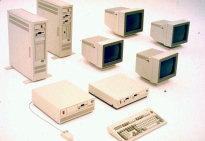 So here I am, years later, after spending thousands upon thousands on miscellaneous computers and electronic do-hickeys. I need to drum up some cash. The first thing a traditionalist would say is, “Why not sell what you’ve bought and make some money?” Well, I look around. Gee, don’t I have anything worth anything? What the hell happened to that ten grand I spent over the last five years? I can’t see it anywhere. I look all over the house.. it’s just not there anymore. It has vanished like money poured into a deep, deep hole. Computers are a great way to destroy value. It’s not like what my dad could do with his camera collection, circa 1970-1990. If he wanted a new camera for his collection, he’d just sell his old ones (for about as much or more than he paid for them) to make enough money to buy a new one (of course my dad’s camera collection is becoming obsolete thanks to digital cameras and rapidly losing value, but for over 80 years the technology was basically the same). But it’s more trouble than it’s worth to sell any of my old electronic devices. They’re worth more to me to have them and play with them than the $10 I can make by selling them. And that’s why it’s so easy to collect them. Nobody wants them, they’re useless to people now, and they just take up space. And that’s about when they end up taking up my space instead of theirs, for little or no cost to myself. Initial cost, anyway.